



Unwanted comments, DMs you don't want to read, someone watching your every story — Instagram gives you two tools to deal with it: restrict and block. They work very differently, and choosing the wrong one matters. This guide breaks down the exact difference between Instagram restrict vs block — what each option does, when to use it, and what the other person actually sees.
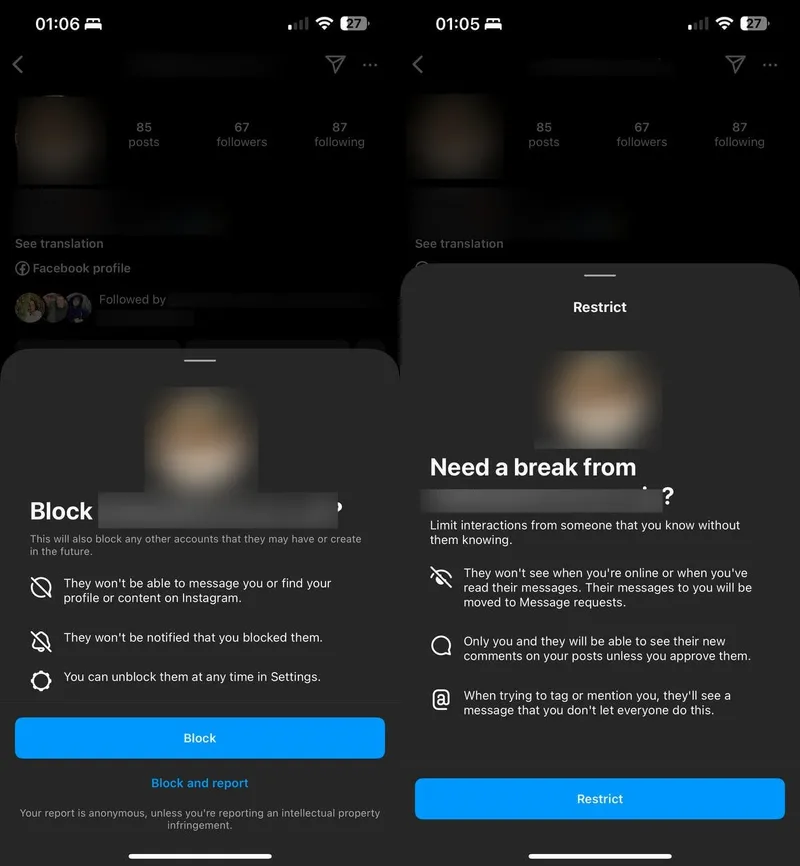
Restricting is the quieter option — the person stays visible on your profile, but their ability to reach you is quietly limited. They won't know anything has changed. Here is what restricting someone on Instagram actually does:
- Comments: Their comments are only visible to them — no one else on your post can see what they wrote. You can review comments manually and choose to approve, delete, or ignore them.
- Messages: Their DMs go directly to your Message Requests folder — not your main inbox. You can read them without triggering a seen receipt. They will never know whether you read the message or not.
- Activity status: They cannot see your active now status or whether you have seen their messages. They can still view your stories and posts — restricting does not hide your content from them.
- Notifications: You receive no notifications for their comments or messages. Instagram filters their activity in the background — nothing surfaces unless you go looking for it manually.
Blocking Someone on Instagram Means

Unlike with the restricting option, once you block someone, your profile disappears for them – they can’t search for you, see your posts, or check out your stories or highlights, which is the perfect way to reclaim your privacy if someone’s creeping a little too hard. So, what does blocking someone on Instagram do?
- Removed interactions: All those likes and comments they’ve left on your posts vanish like they were never there. And don’t worry – they can’t leave any new comments or likes, so your posts feel a lot more like yours. No more random, annoying comments on that cute vacation photo!
- Messaging restrictions: Blocking shuts down their ability to slide into your DMs, and if they try to message you, you’ll never see it. That said, the old message threads between you two will still hang around in your inbox, but nothing new will pop up. If you’re both in the same group chat, Instagram even allows you to either peace out of the group or stick around.
- No notifications: Instagram doesn’t send out a big flashing alert saying, “You’ve been blocked!” (thank goodness), but if the person’s paying attention, they might figure it out. Their comments are gone, they can’t tag you, and your profile’s nowhere to be found – it’s not rocket science. But hey, if they’re blocked, they probably gave you a good reason to do it in the first place.
- Multi-account blocking: If the person has other accounts – or might create new ones just to bug you – you can block all of them in one go. Instagram lets you block all their “current and future” accounts. Just keep in mind if you’re already following some of their other accounts, you’ll have to block those individually.
Instagram Restrict vs. Block: The Impact on Comments
Now that we’ve cleared how both options work individually, let’s tackle the differences between Instagram restrict vs. block in one fell swoop! We will start with the comment section, which is the most visited place on all of IG, where you can find a friend or start a fight. That being said, this is how restricting comments differs from straight-up blocking someone:
- Visibility: Blocking means a person can’t comment on your posts at all, so you don’t have to deal with their input. With restriction, they can still comment, but only they can see it. You won’t have to worry about their comments affecting you or your audience, and they won’t know they’re restricted.
- Notifications: Blocking gets rid of any notifications from the blocked person since they can’t interact with you at all. Restricting means you won’t get notified about their comments, but you can still see them if you manually check your posts. Their comments will show up under a “See comment” button, where you can decide whether to approve or delete them.
- User awareness: When you block someone, it’s pretty obvious to them since they can’t see your posts or comment on anything. Restricting is much sneakier – they can still comment and interact, but they won’t realize their comments are hidden from everyone but themselves.
- Long-term interaction: Blocking is great if you want to stop all interaction with someone for good. Restricting lets them keep engaging, but you can filter out their comments so you’re not dealing with unnecessary drama.
The Influence on Messages
While the comment section is an open field (unless your account is set to be private), DMs are a place for the chosen ones. However, that doesn’t mean that people there don’t go nuts every once in a while – think about overbearing in-laws or an ex with a ton of fake accounts made just to monitor you. The choice is yours, and you can enforce Instagram restrict vs. block them – just know what you’ll be dealing with first:
- Messaging access: If you block someone, users can’t message you at all, no matter what, and your DMs will be completely off-limits to them. However, if you restrict someone, they will still be able to send you messages, but those messages will get dumped into your Message Requests. You can see them if you want, but they’ll have no clue if you’ve read it or not.
- Notifications: Blocking is the cleanest option here – no messages means no notifications, end of story. With restricting, you won’t get alerts for their messages either, but they will still be in the Request folder, waiting for you to decide if they’re worth your time. If you want to check what someone is posting without them knowing, see how to check someone's Instagram activity.
- Read receipts: When you block someone, you won’t have receipts, so there’s nothing to worry about. If you restrict someone, though, you will still be able to read their messages in the Requests folder without triggering that dreaded “seen” notification. They’ll never know how you looked, which can be kind of satisfying.
- Group chats: Blocking someone takes them completely out of your group chat world. You won’t see their messages, and it’s like they don’t exist. Restricting works differently – they can still send messages in the group chat, and you’ll see them. But Instagram will let you know if someone you restricted is in the group, so you can decide whether to stay or bounce.
Instagram Restrict vs Block — Full Comparison
In the table below, we’ve compiled the most commonly remembered differences between Instagram block vs. restrict. Take a look!
| Feature | Restrict | Block | Mute |
|---|---|---|---|
| Profile visibility | Can still see your profile, posts, and stories. | Cannot find or view your profile, posts, or stories. | Can still see your profile and posts. |
| Tag in photos | Can tag you — you control visibility. | Cannot tag you in photos. | Can tag you normally. |
| Mention username | Can mention you — you decide if visible. | Cannot mention your username anywhere. | Can mention you normally. |
| DMs | Messages go to Message Requests folder. | Cannot message you at all. | Can message you normally. |
| Notifications | Muted — you can check manually. | No notifications or interactions reach you. | You still receive notifications normally. |
| Your feed | Their posts still appear in your feed. | Their profile is invisible to you too. | Their posts are hidden from your feed. |
| Reversibility | Unrestrict anytime — no trace. | Unblock anytime — deleted interactions not restored. | Unmute anytime — no trace. |
| User awareness | Not notified — unlikely to notice. | No notification — but may notice they can't find you. | No notification — no way to know. |
Mute is the lightest option — their content disappears from your feed but nothing else changes. Restrict sits in the middle. Block is the full cut.
Want to See What Someone Is Posting Even If They've Blocked You?
Now, you might not want to block someone but want to see what they're posting regardless — maybe you've been blocked yourself, or the account is private.
Instagram private account viewer is the professional-grade solution. No install needed, no Instagram login required. Enter a username, choose a plan, and content loads into your personal dashboard.
- Private Account Viewer — access private profiles without sending a follow request or appearing in their followers list.
- Personalized Content Hub — posts and stories saved for up to 3 months, including stories that have already expired on Instagram.
- Advanced Analytics Dashboard — track posting activity and profile changes over time without repeat manual visits.
- Security — your viewing activity stays private. Nothing is logged or passed to third parties.
- Premium Support — 24/7 live chat and phone. A real person, anytime.
For more on what Accountviewer can access, see how to hide your Instagram activity.
FAQ
Restricting limits someone's interaction quietly — their comments are hidden from others and their DMs go to a request folder, but they can still see your profile. Blocking removes them entirely — they cannot find your profile, see your posts, or contact you.
Yes. A restricted person can still view your profile, posts, and stories as normal. The only difference is their comments are hidden from everyone except themselves, and their DMs go to your Message Requests folder.
No. Instagram sends no notification for either action. A blocked person may eventually notice they cannot find your profile. A restricted person typically has no way of knowing.
Mute hides someone's content from your feed without affecting how they interact with you. Restrict limits their commenting and messaging quietly. Block cuts all contact and removes your profile from their view entirely.